Butterfly Knife | Bright Water
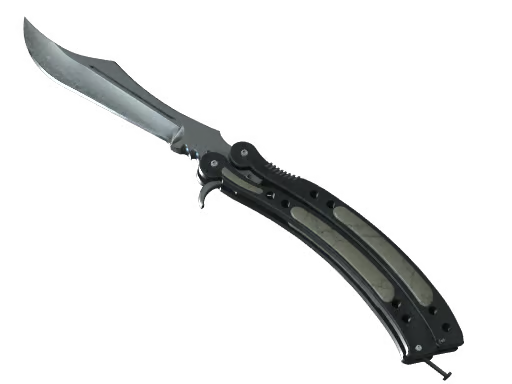
- Wear range
- 0.00–0.50
- Released
- Unavailable
- Paint kit
- 578
- Finish style
- Hydrographic
- Collection
- Unavailable
- Drop chance (estimate)
- Unavailable
Steam market price
CNY
Unavailable
Introduction
Clear Water (hy_ocean_knife, listed in-game as knife | Clear Water) is one of those finishes that applies to every knife type in CS2—Bayonet, Flip, Butterfly, you name it. Valve dropped it with Operation Riptide on September 21, 2021 as part of that update’s knife skin expansion. Rarity is Rare, application is hydrographic, and wear runs 0.00–0.50 (Factory New through Battle-Scarred—no Beyond Battle-Scarred tier). The pitch is simple on paper: blue camouflage over the blade. In practice, the knife silhouette decides how that camo stretches, catches light, and reads in first-person inspect.
What you’re actually buying
This isn’t a workshop skin—design credit sits with Valve, and the pattern sits in the same “built-in camo” family as the name suggests: cool, relatively clean blues rather than noisy neons. Hydrographic means the blue patches wrap the steel as a skin-wide print; the finish name stays the same whether you’re on a slim Flip or a wide Butterfly. Preview art uses the Butterfly Knife, which is the stress test: lots of curves and edge length, so the same camo brightens and dims hard as you rotate—exactly what you’ll notice when you slow-spin in inspect.
Wear behavior: low float keeps blues saturated and edges crisp. As wear climbs, the camo grays out and patches break apart; even Battle-Scarred usually still shows base metal, and because the cap is 0.50, BS here is the “well-used” end—not the absolute wreck some other skins hit. Collectors chase FN/MW for display; players who just want a cool-tone daily blade often take slightly higher wear for a thinner price tag.
Shop checklist: inspect, wear, and knife model
- Don’t trust the thumbnail. Spin the knife in inspect and watch the spine, guard, and tip—those are the zones people care about for “does the blue land where I want it?”
- Butterfly-only extra: run the open/close animation. Hydrographic seams can look fine static and awkward in motion if a patch cuts across a hinge line.
- Pick the knife first, then the float band. Clear Water on different models often separates in price more than one or two wear steps on the same knife. Lock your blade type, then compare listings in the same wear bracket on Steam Community Market or C5GAME.
- Rare, not covert—it’s an entry-friendly blue theme from a named operation era, not a flex tier skin. Value is mostly aesthetic + knife tax, not rarity chase.
Buying guide verdict
Worth it if you want a universal, operation-era blue camo that reads clearly in-game and you’ve already chosen which knife animation/profile you like. Skip or downgrade wear if you’re paying premium for FN but the blue sits mostly on parts you never see in your POV.
Practical move: set a knife model budget first, aim for MW or better if blues matter to you, and only pay FN premiums when inspect proves strong placement on spine and tip.
Editor’s aside: Riptide added a lot of noise; Clear Water wins on clarity—the name matches the vibe. On Butterfly, treat it like a lighting skin: same float, different listing photo, totally different feel. That’s not pattern float RNG in the Doppler sense; it’s geometry. Two shoppers, two “perfect” clears, zero drama—until someone opens the knife in spawn and the camo shifts. That’s the whole game with this one.