Butterfly Knife | Doppler
- Wear range
- 0.00–0.08
- Released
- 2017-03-01
- Paint kit
- 619
- Finish style
- Anodized Multicolored
- Sources
- Spectrum Case、Spectrum 2 Case
- Drop chance (estimate)
- Spectrum Case:Any rare special item 0.256%; exact finish probability undisclosed;Spectrum 2 Case:Any rare special item 0.256%; exact finish probability undisclosed
BUFF · 收盘参考价
CNY
- Factory New¥38,270.00
- Minimal Wear¥37,000.00
StatTrak™
- Factory New¥34,500.00
Introduction
If you’re shopping knife skins, Doppler is one of those finishes you recognize before you read the name: gem-toned flashes that slide across the blade as you move the camera, layered over a black-and-silver faux-marble base with a glossy “candy coat” on top. It’s pretty on purpose—and the in-game line about being fooled by the look is basically a warning not to treat it like wallpaper.
Quick specs (buyers’ cheat sheet)
- Category: knife
- Finish: Doppler
- Rarity: Legendary
- Craft: multicolor electroplating
- Wear range: 0.00–0.08 (Factory New and Minimal Wear only)
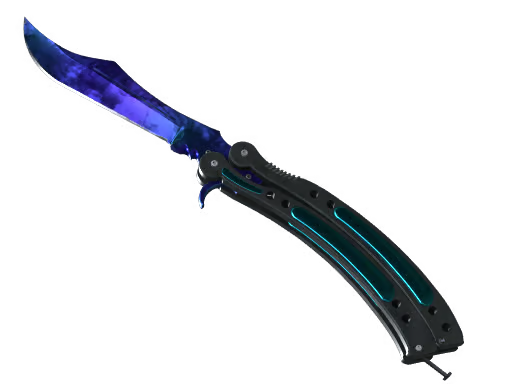
The preview image above is a Sapphire-style phase read: blue–violet gem body with marble grain drifting underneath. Your phase—not the knife model alone—sets the main color story.
Where it came from (and why that matters for price)
Doppler knives landed March 15, 2017, the same day Valve’s Take a trip to the Canals post dropped the Spectrum Weapon Case and the broader Canals-themed wave. Valve built the finish in-house (not a Workshop skin), and phase support has been maintained across official updates since.
Spectrum Case is still the classic origin story. Legendary tier means both unboxing odds and resale liquidity skew expensive—before you commit, pull up the same phase on C5GAME or the Steam Community Market and compare float, price, and listing photos side by side.
How to inspect before you pay
- Spin it slowly in 3D inspect. Phase controls the dominant hue; light angle controls where the bright gem band sits. Two “same phase” listings can look like different skins under different lighting.
- Treat 0.08 like a hard ceiling. With such a narrow window, the gap between a clean 0.01 and a tired 0.07 shows up fast—especially at the tip, spine, and handle transitions, where micro-scratches love to hide in screenshots.
- Zoom the choke points. For collection pieces, stare at the heel near the blade root and screws / pivot area. Sellers’ hero angles often skip exactly where float hurts resale.
Shopping verdict
Buy if: you want a long-running showpiece tied to Spectrum-era knife history, you’ve confirmed phase in inspect, and the float matches the premium (sub-0.02 for flex, higher only if the price reflects wear).
Pass or downgrade if: the listing hides spine/tip wear, phase looks muddy in inspect, or you’re paying Sapphire/P2/Ruby-tier money without verifying phase on a neutral background.
Where to hunt: compare wear and phase on C5GAME and Steam; legendary Doppler rarely “discounts itself” without a reason.
Editor’s mumbling
Doppler is the finish that teaches new collectors what phase means the hard way. I’ve seen people fall in love with a thumbnail sapphire glow, then notice spine scuffs that drop it out of the “insta-flex” tier. With wear capped at 0.08, you’re not really choosing “battle-scarred character”—you’re choosing how picky you are. Slow inspect, rude zoom on the tip, then talk money.